
Scripting
HarborClient lets you run JavaScript before and after each HTTP request. Scripts run in an isolated sandbox and use the global hc object to read and modify the outgoing request, set variables, and assert on the response.
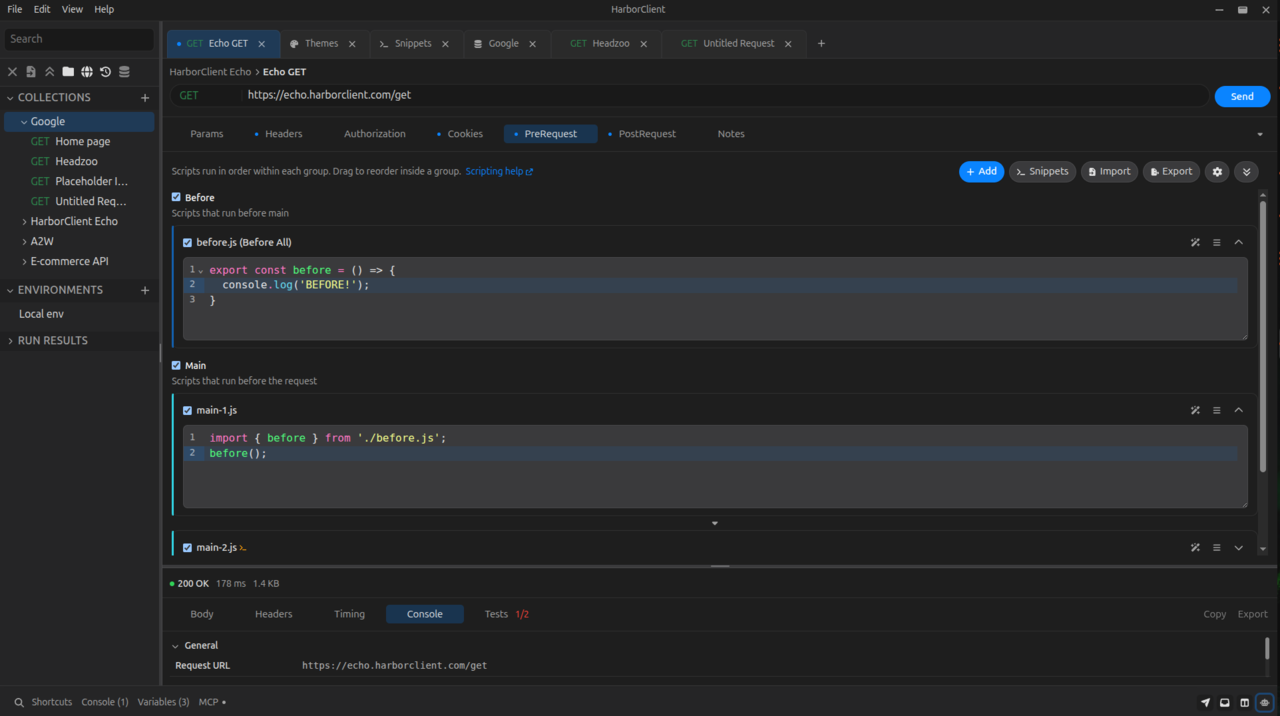
Scripts can be defined at:
- Collection — in collection settings, under the PreRequest and PostRequest tabs. Each tab is a request stage with an ordered list of scripts that run for every request in the collection.
- Request — in the request editor, under the PreRequest and PostRequest tabs. Each tab is a request stage with an ordered list of scripts that run only for that saved request.
- Live server — in the live server footer panel, under the Scripts tab (PreRequest / PostRequest). Matching path patterns select which scripts run for each incoming request — see Live servers — Scripts.
Collection, request, and live-server scripts use the same hc API and the same JavaScript sandbox.
Terminology: HarborClient has two request stages — pre-request and post-request — shown as the PreRequest and PostRequest tabs. Within each request stage, every script row also has a Stage value (Before all, Before each, Main, After each, or After all) that controls when it runs in that list.
Each PreRequest or PostRequest tab shows an ordered script list for that request stage. For each script you can:
- Enable or disable it with the checkbox (disabled scripts are skipped at send time)
- Rename it with the editable label (used in the send console)
- Expand or collapse the code editor
- Ask AI about the script with the wand icon (shown only when AI is available — a personal API key or a connected Team Hub with LLM models). Opens the AI sidebar, starts a new chat, and prefills the composer with a script reference token — see AI assistant — Script references
- Reorder scripts by dragging when the list has two or more entries
- Add a new inline script (choose a Stage), Import a
.jsfile as a new snippet (opens the add-snippet dialog with imported source), or open Snippet library... to reference a saved snippet from Settings → Snippets or File → Snippets - Remove a script from the list
Guide
- Multiple scripts — stages, ordering, and send-time execution
- Snippets — reusable script blocks and
importsyntax - API —
hc.*andconsole.*reference by namespace - What gets applied back — which mutations affect the send or persist
- Sandbox limits — timeout, network, filesystem, and language limits
- Examples — common pre- and post-request patterns
- Migrating from Postman —
pm→hcmapping - API Index — alphabetical method index