
Request scripts
HarborClient lets you run JavaScript before and after each HTTP request. Scripts run in an isolated sandbox and use the global hc object to read and modify the outgoing request, set variables, and assert on the response.
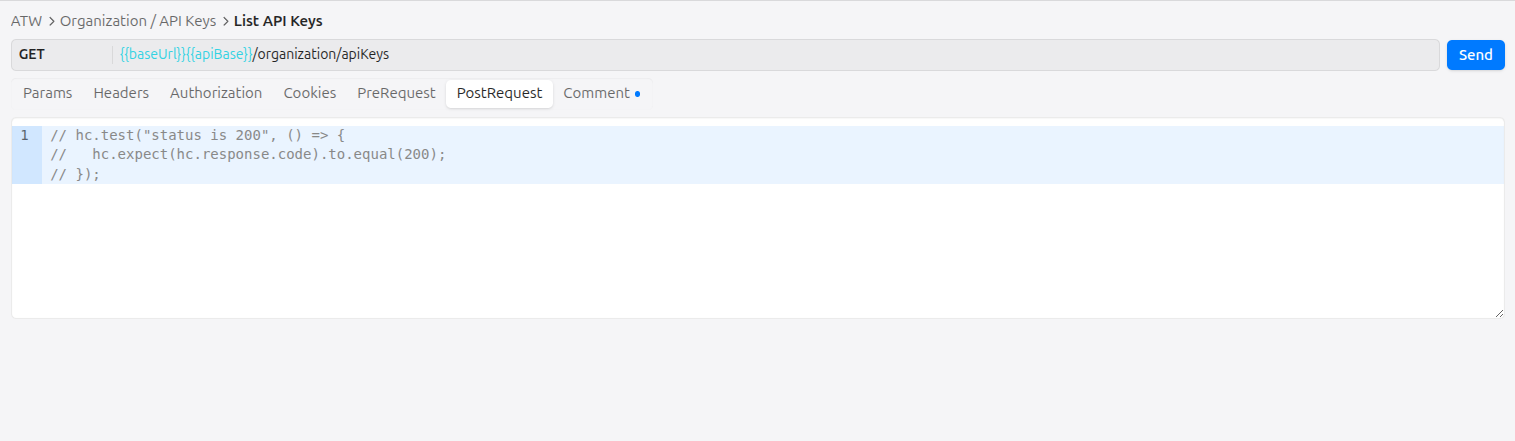
Scripts can be defined at two levels:
- Collection — in collection settings, under Pre-request script and Post-request script. These run for every request in the collection.
- Request — in the request editor, under the Pre and Post tabs. These run only for that saved request.
Both levels use the same hc API and the same JavaScript sandbox.
Execution order
When you send a request, scripts run in this order:
- Collection pre-request script
- Request pre-request script
- HTTP request is sent
- Collection post-request script
- Request post-request script
Empty scripts are skipped. Within each phase, variable values set by earlier scripts are available to later scripts and to {{variable}} substitution when the request is sent.
The hc object
All script APIs are exposed on the global hc object. The editor provides autocomplete for hc members; keep custom snippets aligned with the reference below.
Plugins use the same hc name with a broader API for UI contributions, storage, and HTTP hooks. Plugin APIs are not available inside collection or request scripts.
hc.request
Read and write the outgoing request. Available in both pre- and post-request scripts. Changes made in pre-request scripts affect the request that is sent; changes in post-request scripts do not re-send the request.
hc.request.method
Type: string (get/set)
HTTP method for the request (for example GET, POST).
hc.request.method = 'POST';hc.request.url
Type: string (get/set)
Request URL. Setters coerce the value to a string.
hc.request.url = 'https://api.example.com/v1/users';hc.request.body
Type: string (get/set)
Request body as text. Setters coerce the value to a string.
hc.request.body = JSON.stringify({ name: 'Ada' });hc.request.headers
Header helpers for the request-level header list (not collection-level headers).
hc.request.headers.get(key)
Signature: (key: string) => string | undefined
Returns the value of the first enabled header whose name matches key case-insensitively. Returns undefined if no matching header exists.
var auth = hc.request.headers.get('Authorization');hc.request.headers.upsert(key, value)
Signature: (key: string, value: string) => void
Updates the value of an existing enabled header with the same name (case-insensitive), or appends a new enabled header if none exists.
hc.request.headers.upsert('Authorization', 'Bearer ' + hc.variables.get('token'));hc.request.headers.toObject()
Signature: () => Record<string, string>
Returns a plain object of all enabled headers with non-empty keys. Header names are preserved as stored; duplicate keys are not merged in the object (last wins depends on iteration order).
var headers = hc.request.headers.toObject();
console.log(headers['Content-Type']);
hc.variables
Get and set variables for the current send. Collection variables are loaded at the start of the send; values set with hc.variables.set are ephemeral and apply only to the current send (they are not persisted to the collection).
Variables can be referenced elsewhere with {{key}} syntax in URLs, headers, params, body, and script source. Script source is substituted before each script runs, so a variable set in an earlier script is available to later scripts and to the outgoing request.
hc.variables.get(key)
Signature: (key: string) => string | undefined
Returns the session value set during this send (via hc.variables.set) if present; otherwise returns the collection variable value. Returns undefined if the key is not set.
var token = hc.variables.get('token');hc.variables.set(key, value)
Signature: (key: string, value: string) => void
Sets an ephemeral variable for the remainder of this send. Values are coerced to strings.
hc.variables.set('token', 'abc123');
hc.variables.set('timestamp', String(Date.now()));
hc.collection.variables
Get and set collection variables for the current send. Values set with hc.collection.variables.set are persisted to the collection after the send completes (unlike hc.variables.set, which is ephemeral).
Collection variables can be referenced elsewhere with {{key}} syntax in URLs, headers, params, body, and script source.
hc.collection.variables.get(key)
Signature: (key: string) => string | undefined
Returns the value set during this send (via hc.collection.variables.set) if present; otherwise returns the merged runtime variable value (collection and environment). Returns undefined if the key is not set.
var token = hc.collection.variables.get('token');hc.collection.variables.set(key, value)
Signature: (key: string, value: string) => void
Sets a collection variable for the remainder of this send and persists it to the collection when the send completes. Values are coerced to strings. New keys are added to the collection with an empty default and share: false.
hc.collection.variables.set('token', 'abc123');
hc.collection.variables.set('timestamp', String(Date.now()));
hc.collection.name
Type: string (read-only)
Display name of the collection the request belongs to. Empty string when the request has no collection.
console.log('Collection:', hc.collection.name);hc.collection.id
Type: number | null (read-only)
Storage id of the collection, or null when the request has no collection.
console.log('Collection id:', hc.collection.id);hc.collection.headers
Read and write collection-level headers sent with every request in the collection. Header values support {{variable}} syntax. Changes made via hc.collection.headers.upsert apply to the current send and are persisted to the collection after the send completes.
Request-level headers override collection headers when both define the same header name (case-insensitive).
hc.collection.headers.get(key)
Signature: (key: string) => string | undefined
Returns the value of the first enabled collection header whose name matches key case-insensitively. Returns undefined if no matching header exists.
var auth = hc.collection.headers.get('Authorization');hc.collection.headers.upsert(key, value)
Signature: (key: string, value: string) => void
Updates the value of an existing enabled collection header with the same name (case-insensitive), or appends a new enabled header if none exists. Persisted to the collection when the send completes.
hc.collection.headers.upsert('Authorization', 'Bearer ' + hc.collection.variables.get('token'));hc.collection.headers.toObject()
Signature: () => Record<string, string>
Returns a plain object of all enabled collection headers with non-empty keys.
var headers = hc.collection.headers.toObject();
console.log(headers['Content-Type']);
hc.environment
Read and write variables on the active environment. When no environment is selected, hc.environment.name is an empty string and variable sets apply to the current send only (they are not persisted).
hc.environment.name
Type: string (read-only)
Display name of the active environment. Empty string when no environment is selected.
console.log('Environment:', hc.environment.name);hc.environment.variables.get(key)
Signature: (key: string) => string | undefined
Returns the value set during this send (via hc.environment.variables.set) if present; otherwise returns the merged runtime variable value (collection and environment). Returns undefined if the key is not set.
var token = hc.environment.variables.get('token');hc.environment.variables.set(key, value)
Signature: (key: string, value: string) => void
Sets an environment variable for the remainder of this send and persists it to the active environment when the send completes. Values are coerced to strings. New keys are added to the environment with an empty default and share: false. When no environment is active, the value applies to the send only.
hc.environment.variables.set('token', 'abc123');
hc.environment.variables.set('timestamp', String(Date.now()));
hc.test(name, fn)
Signature: (name: string, fn: () => void) => void
Registers a named test. If fn completes without throwing, the test passes. If fn throws (including failed hc.expect assertions), the test fails and the error message is recorded.
Tests are most useful in post-request scripts. Results appear in the response viewer Tests tab after the send completes.
hc.test('status is 200', function () {
  hc.expect(hc.response.code).to.equal(200);
});
hc.expect(actual)
Signature: (actual: unknown) => Expect
Returns an assertion helper for use inside hc.test. Failed assertions throw an Error with a descriptive message.
hc.expect(actual).to.equal(expected)
Strict equality (===). Use for primitives and reference checks.
hc.expect(hc.response.code).to.equal(200);
hc.expect(hc.response.status).to.equal('OK');
hc.expect(actual).to.eql(expected)
Deep equality via JSON.stringify comparison. Use for objects and arrays.
hc.expect(hc.response.json()).to.eql({ ok: true });hc.expect(actual).to.include(substr)
Asserts that actual is a string containing substr.
hc.expect(hc.response.text()).to.include('"ok":true');hc.expect(actual).be.ok()
Asserts that actual is truthy.
hc.expect(hc.response.headers['content-type']).be.ok();hc.response
Available in post-request scripts only. Not defined during pre-request scripts.
Read-only access to the HTTP response from the send that just completed.
hc.response.code
Type: number (read-only)
HTTP status code (for example 200, 404). Maps to the response status field.
hc.expect(hc.response.code).to.equal(200);hc.response.status
Type: string (read-only)
HTTP status text (for example OK, Not Found).
console.log(hc.response.status);hc.response.headers
Type: Record<string, string> (read-only)
Response headers as a flat key-value map.
var contentType = hc.response.headers['content-type'];hc.response.responseTime
Type: number (read-only)
Round-trip time for the request in milliseconds.
hc.test('responds quickly', function () {
  hc.expect(hc.response.responseTime < 1000).be.ok();
});
hc.response.text()
Signature: () => string
Returns the response body as a string.
var body = hc.response.text();hc.response.json()
Signature: () => unknown
Parses the response body as JSON and returns the result. Throws if the body is not valid JSON.
var data = hc.response.json();
hc.expect(data.id).be.ok();
console
Scripts can log output with a limited console object. Log lines are captured and shown in the send console after the request completes.
console.log(...args)
Signature: (...args: unknown[]) => void
Logs one or more values. Non-string arguments are JSON-stringified; arguments are joined with spaces.
console.log('token set:', hc.variables.get('token'));console.error(...args)
Signature: (...args: unknown[]) => void
Same as console.log, but each line is prefixed with [error].
console.error('missing token');What gets applied back
After each script runs, HarborClient applies these changes:
| Change | Applied to sent request | Persists to saved request |
|---|---|---|
hc.request.method, url, body, headers | Yes (pre scripts only) | No |
hc.variables.set | Yes (via {{key}} substitution) | No (session only) |
hc.collection.variables.set | Yes (via {{key}} substitution) | Yes (collection variables) |
hc.collection.headers.upsert | Yes (collection headers on send) | Yes (collection headers) |
hc.environment.variables.set | Yes (via {{key}} substitution) | Yes (active environment variables) |
hc.test results | N/A | Shown in response viewer |
console.log / console.error | N/A | Shown in send console |
Request params and body type are not modified by scripts. Post-request changes to hc.request do not trigger a second send.
Variable resolution order for hc.variables.get:
- Value set with
hc.variables.setduring this send - Active environment variable value (or default if the value is empty)
- Collection variable value (or default if the value is empty)
Variable resolution order for hc.collection.variables.get:
- Value set with
hc.collection.variables.setduring this send - Merged runtime variable value (collection and environment, same order as above)
Variable resolution order for hc.environment.variables.get:
- Value set with
hc.environment.variables.setduring this send - Merged runtime variable value (collection and environment, same order as above)
See Environments for how collection and environment variables are merged at send time.
Sandbox limits
Scripts run inside a node:vm sandbox in the main process:
- Timeout: 5 seconds per script
- No I/O: no network, filesystem,
require,import, or DOM APIs are exposed to the script - Language: modern JavaScript (scripts are transpiled with esbuild before execution).
import,require, and external modules are not supported. - Globals: only
hc,console, and standard JavaScript globals are available
If a script throws or times out, the error is recorded and the send continues with the last known request state. Syntax errors and runtime exceptions surface in the send console.
Examples
Pre-request: set URL, header, and token
Runs before the request is sent. Sets the target URL, attaches an auth header, and stores a token for {{token}} substitution elsewhere.
hc.request.url = 'https://api.example.com/v1/users';
hc.request.method = 'GET';
hc.variables.set('token', 'abc123');
hc.request.headers.upsert('Authorization', 'Bearer ' + hc.variables.get('token'));
console.log('pre-request ran');
Post-request: assert status and JSON body
Runs after the response is received. Registers tests that appear in the Tests tab.
hc.test('status is 200', function () {
  hc.expect(hc.response.code).to.equal(200);
});

hc.test('body has ok', function () {
  hc.expect(hc.response.json()).to.eql({ ok: true });
});
Chain variables across collection and request scripts
Collection pre-request script:
hc.variables.set('baseUrl', 'https://api.example.com');Request pre-request script:
hc.request.url = hc.variables.get('baseUrl') + '/v1/status';The request URL becomes https://api.example.com/v1/status when sent.
Migrating from Postman
When you import a Postman collection, HarborClient copies pre-request and post-request script text into the collection and request settings verbatim. Postman scripts use the global pm object; HarborClient scripts use hc. There is no pm compatibility layer — any pm.* reference throws pm is not defined at runtime.
After import, open each script and rewrite it against the hc API described above. The sections below map common Postman patterns to HarborClient equivalents and call out features that have no direct replacement.
pm to hc API mapping
Postman (pm) | HarborClient (hc) | Notes |
|---|---|---|
pm.variables.get(key) / pm.variables.set(key, value) | hc.variables.get(key) / hc.variables.set(key, value) | Session-only; not persisted after the send |
pm.environment.get(key) / pm.environment.set(key, value) | hc.environment.variables.get(key) / hc.environment.variables.set(key, value) | Persists to the active environment when one is selected |
pm.collectionVariables.get(key) / pm.collectionVariables.set(key, value) | hc.collection.variables.get(key) / hc.collection.variables.set(key, value) | Persists to the collection after the send |
pm.globals.get(key) / pm.globals.set(key, value) | hc.variables.set(key, value) or hc.environment.variables.set(key, value) | HarborClient has no workspace globals; use session variables or environment variables |
postman.setEnvironmentVariable(key, value) | hc.environment.variables.set(key, value) | Legacy Postman alias |
postman.setGlobalVariable(key, value) | hc.variables.set(key, value) | Legacy Postman alias; session only in HarborClient |
pm.request.method | hc.request.method | Get/set |
pm.request.url | hc.request.url | Get/set |
pm.request.body (raw mode) | hc.request.body | Get/set as text |
pm.request.headers.get(key) | hc.request.headers.get(key) | Case-insensitive |
pm.request.headers.add({ key, value }) / pm.request.headers.upsert({ key, value }) | hc.request.headers.upsert(key, value) | HarborClient uses separate key and value arguments |
pm.request.headers.toObject() | hc.request.headers.toObject() | Plain object of enabled headers |
pm.response.code | hc.response.code | HTTP status code (e.g. 200) |
pm.response.status | hc.response.status | Status text (e.g. OK) |
pm.response.text() | hc.response.text() | Response body as string |
pm.response.json() | hc.response.json() | Parses JSON; throws on invalid JSON |
pm.response.responseTime | hc.response.responseTime | Round-trip time in milliseconds |
pm.response.headers.get(name) | hc.response.headers[name] | Flat read-only map; use bracket notation, not .get() |
pm.test(name, fn) | hc.test(name, fn) | Same pattern |
pm.expect(actual).to.equal(expected) | hc.expect(actual).to.equal(expected) | Strict equality |
pm.expect(actual).to.eql(expected) | hc.expect(actual).to.eql(expected) | Deep equality via JSON comparison |
pm.expect(actual).to.include(substr) | hc.expect(actual).to.include(substr) | String contains |
pm.expect(actual).to.be.ok | hc.expect(actual).be.ok() | HarborClient uses .be.ok() as a method call, not .to.be.ok |
pm.response.to.have.status(200) | hc.expect(hc.response.code).to.equal(200) | No Chai-style response matchers |
Collection-level headers in Postman are usually set in the collection UI. In HarborClient, use hc.collection.headers.upsert(key, value) in a script or configure headers in collection settings. See hc.collection.headers above.
Not supported
These Postman script features have no HarborClient equivalent:
pm.sendRequest(...)— scripts cannot make outbound HTTP requests. The sandbox has no network access; see Sandbox limits.require(...)/ bundled libraries — lodash, crypto-js, cheerio, ajv, and other Postman built-ins are not available.- Extended Chai matchers —
hc.expectsupports onlyto.equal,to.eql,to.include, andbe.ok(). Matchers such asto.be.a,to.have.property, andpm.response.to.be.okmust be rewritten. pm.info,pm.iterationData, visualizers, and the legacytests["name"] = trueglobal.- Request params and body type — scripts cannot change query params or switch between JSON, form, and multipart body modes; only
hc.request.bodytext is writable.
Modern JavaScript syntax (const, arrow functions, template literals, optional chaining, and similar) is supported in migrated scripts. import, require, and bundled libraries remain unavailable; see Sandbox limits.
Example: rewrite a Postman test script
Postman post-request script:
var jsonData = pm.response.json();
pm.environment.set('token', jsonData.token);

pm.test('Status code is 200', function () {
  pm.response.to.have.status(200);
});

pm.test('Content-Type is JSON', function () {
  pm.expect(pm.response.headers.get('Content-Type')).to.include('application/json');
});
Equivalent HarborClient post-request script:
var jsonData = hc.response.json();
hc.environment.variables.set('token', jsonData.token);

hc.test('Status code is 200', function () {
  hc.expect(hc.response.code).to.equal(200);
});

hc.test('Content-Type is JSON', function () {
  hc.expect(hc.response.headers['content-type']).to.include('application/json');
});
For collection import behavior and other Postman feature gaps, see Collections — Postman collections.