
Testing
HarborClient lets you write automated checks on HTTP responses using JavaScript in post-request scripts. Each check is a named test that passes when its assertions succeed and fails when an assertion throws. Results appear in the response viewer Tests tab after you send a request.
Tests use the same sandbox and hc object as other request scripts. See Request scripts for the full API reference.
Where tests run
Tests belong in post-request scripts — either at the collection level or on an individual saved request. Each PostRequest tab holds an ordered list; you can place tests in any enabled script entry.
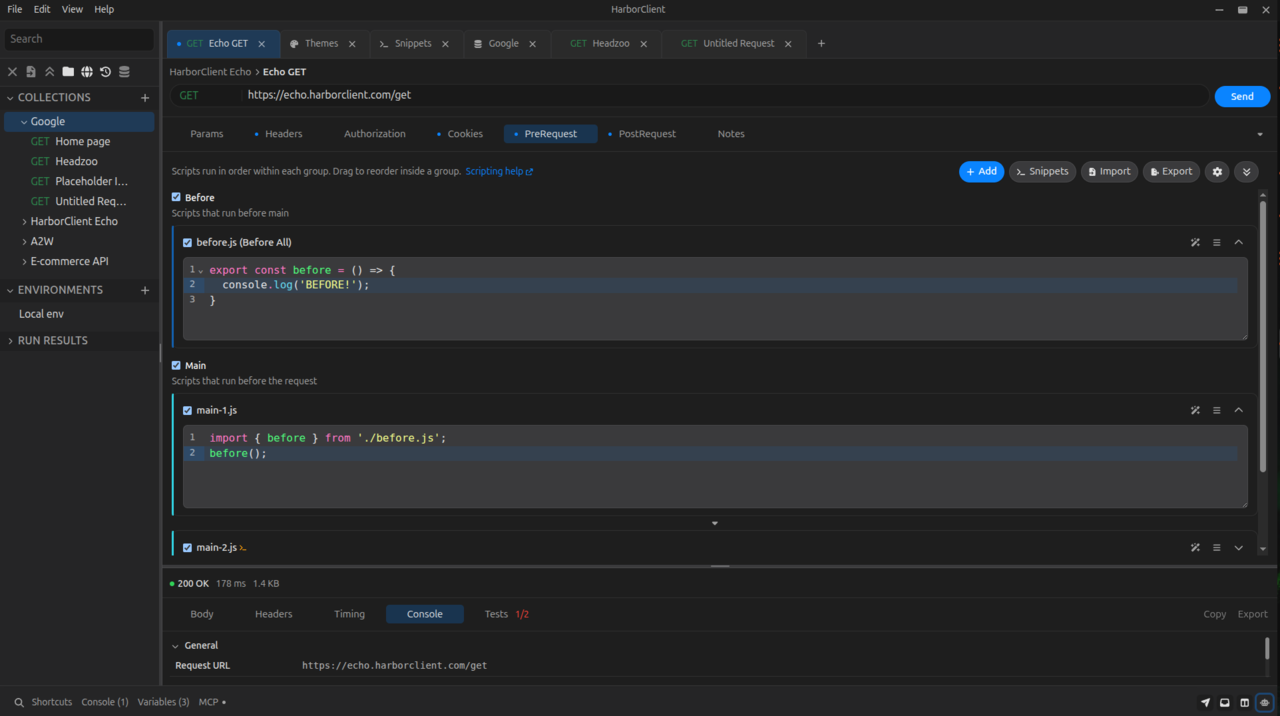
- Collection post-request scripts — in collection settings, PostRequest tab. Each enabled script in the list runs after every request in the collection.
- Request post-request scripts — in the request editor, PostRequest tab. Each enabled script in the list runs only for that saved request.
When you send a request, scripts run in this order:
- Each enabled collection pre-request script, in list order
- Each enabled request pre-request script, in list order
- HTTP request is sent
- Each enabled collection post-request script, in list order
- Each enabled request post-request script, in list order
Tests in collection post-request scripts run before tests in request post-request scripts. Within each list, earlier scripts run before later ones. All tests see the same response from the send that just completed.
hc.response is available only during post-request scripts. Pre-request scripts cannot read the response or register tests against it.
Writing a test
Use hc.test(name, fn) to register a named test. HarborClient runs fn immediately. If fn completes without throwing, the test passes. If fn throws — including when an hc.expect or hc.response.to assertion fails — the test fails and the error message is recorded.
hc.test("status is 200", function () {
  hc.response.to.have.status(200);
});
Give each test a short, descriptive name. The name is shown in the Tests tab so you can tell at a glance which check failed.
Assertions
Inside a test, use hc.expect(actual) to assert on a value. HarborClient uses Chai.js BDD syntax — the same assertion library Postman uses for pm.expect. See the Chai BDD API reference for the full matcher list.
Common assertions
hc.expect(actual).to.equal(expected)
Strict equality (===). Use for numbers, strings, booleans, and other primitives.
hc.expect(hc.response.code).to.equal(200);
hc.expect(hc.response.status).to.equal("OK");
hc.expect(actual).to.eql(expected)
Deep equality. Use for objects and arrays when you want to compare structure and values. Key order does not matter.
hc.expect(hc.response.json()).to.eql({ ok: true, count: 3 });hc.expect(actual).to.include(value)
Asserts that actual contains value. Works on strings (substring), arrays (element), and objects (property).
hc.expect(hc.response.text()).to.include('"status":"success"');
hc.expect(hc.response.json().items).to.include("active");
hc.expect(actual).to.be.ok
Asserts that actual is truthy. Use when you only need to confirm a value exists or is non-empty.
hc.expect(hc.response.headers["content-type"]).to.be.ok;
hc.expect(hc.response.json().id).to.be.ok;
More assertions
Chai provides many additional matchers. Examples:
// Status code is one of several allowed values
hc.expect(hc.response.code).to.be.oneOf([200, 201, 204]);

// Type check
hc.expect(hc.response.status).to.be.a("string");

// Object property
hc.expect(hc.response.json()).to.have.property("id");

// Deep equality with explicit alias
hc.expect({ a: 1, b: 2 }).to.deep.equal({ b: 2, a: 1 });

// Custom failure message (second argument)
hc.expect(hc.response.code, "expected success status").to.equal(200);
See Request scripts for full signatures and additional hc members you can use alongside tests.
Response assertions
For Postman-style checks on the response itself, use hc.response.to:
hc.test("status is 200", function () {
  hc.response.to.have.status(200);
});

hc.test("returns JSON", function () {
  hc.response.to.be.json;
});

hc.test("content type", function () {
  hc.response.to.have.header("content-type", "application/json");
});

hc.test("body shape", function () {
  hc.response.to.have.jsonBody({ ok: true, count: 3 });
});

hc.test("not a client error", function () {
  hc.response.to.not.be.clientError;
});
Use hc.expect(actual) when you need Chai matchers on values you extract yourself (for example hc.response.json() or hc.response.responseTime).
See Request scripts — hc.response.to for the full matcher list.
Reading results
After a send completes, open the response viewer and select the Tests tab.
Each registered test appears as a row:
- Green dot — the test passed (
fncompleted without throwing). - Red dot — the test failed. The test name and the assertion error message are shown on the same row.
If no tests were registered, the tab is empty. Script errors outside of hc.test (syntax errors, timeouts, or uncaught exceptions in the script body) appear in the send Console, not in the Tests tab.
Use console.log inside a test when you need to inspect values during development. Log lines are captured in the send console.
Common patterns
Check the status code
Postman-style:
hc.test("returns 200", function () {
  hc.response.to.have.status(200);
});
Equivalent with hc.expect:
hc.test("returns 200", function () {
  hc.expect(hc.response.code).to.equal(200);
});
Check status text
hc.test("status text is OK", function () {
  hc.response.to.have.status("OK");
});
Validate JSON body shape
hc.test("body matches expected shape", function () {
  hc.response.to.have.jsonBody({
    id: 42,
    name: "Ada",
    active: true,
  });
});
Or assert on parsed JSON with hc.expect:
hc.test("body matches expected shape", function () {
  hc.expect(hc.response.json()).to.eql({
    id: 42,
    name: "Ada",
    active: true,
  });
});
Check a response header
hc.test("returns JSON content type", function () {
  hc.response.to.have.header("content-type", "application/json");
});
Assert on HTML responses
Use hc.response.document() in post-request tests when the response body is HTML and you want to assert on structure or text without regex on hc.response.text(). This works for full pages, server-rendered fragments, and other HTML bodies where CSS selectors are clearer than string matching.
Call hc.response.document() once per script — the first call parses the body and later calls reuse the same document — then query it with querySelector or querySelectorAll inside hc.test blocks:
var doc = hc.response.document();

hc.test("heading text", function () {
  hc.expect(doc.querySelector("h1")?.textContent).to.equal("Hello");
});

hc.test("heading has title class", function () {
  hc.expect(doc.querySelector("h1")?.getAttribute("class")).to.equal("title");
});

hc.test("list has two items", function () {
  hc.expect(doc.querySelectorAll("li").length).to.equal(2);
});
querySelector returns null when no element matches. Assert presence with .to.be.ok or absence with .to.equal(null):
hc.test("page has login form", function () {
  hc.expect(doc.querySelector("form#login")).to.be.ok;
});

hc.test("no error banner", function () {
  hc.expect(doc.querySelector(".error-banner")).to.equal(null);
});
Keep in mind:
- The parser is Cheerio-backed, not a live browser DOM — no script execution, and elements do not expose nested
querySelector. - CSS selectors only; XPath is not supported.
- HarborClient does not check
Content-Type; it parses whatever body string the response contains.
See Request scripts — hc.response.document() for the full method table and additional examples.
Assert response time
hc.test("responds within one second", function () {
  hc.expect(hc.response.responseTime < 1000).to.be.ok;
});
Save a value for the next request
Use tests together with variable setters when a response value should drive a later request in the same collection.
Ephemeral for the current send only:
hc.test("response includes a token", function () {
  var data = hc.response.json();
  hc.expect(data.token).to.be.ok;
  hc.request.variables.set("token", data.token);
});
Persist to the collection for future sends:
hc.test("store refreshed token", function () {
  var data = hc.response.json();
  hc.expect(data.token).to.be.ok;
  hc.collection.variables.set("token", data.token);
});
See Environments for how collection and environment variables are merged at send time.
Tips and limits
- One concept per test — keep each
hc.testfocused so failures point to a single expectation. - Modern JavaScript — use
const, arrow functions, template literals, top-levelawait, and other modern syntax. Scripts are transpiled and evaluated as async functions in the sandbox. - Script timeout — each script (including all tests inside it) must finish within the limit set in Settings → General (Script timeout (ms); default 5000 ms). Set to
0to disable. - HTML responses — use
hc.response.document()in post-request tests to query the body with CSS selectors (see Assert on HTML responses). - No unrestricted I/O — tests cannot call Node or browser APIs. Outbound HTTP is available only through
await hc.fetch(...)when Allow script network requests is enabled in Settings → General. File access is available only throughawait hc.fs.*when Allow script file read / Allow script file write are enabled (paths confined to the script file root). Onlyhc,console, and standard JavaScript globals are available otherwise. - Independent tests — a failing assertion in one
hc.testdoes not stop other tests in the same script from running. Each test is recorded separately. - Post-request only — you cannot assert on a response in a pre-request script because the response does not exist yet.
What's next
- Request scripts — full
hcAPI reference, execution order, and sandbox limits - Environments — create and switch between variable groups used during sends and tests
- Making requests — send requests, read responses, and use the Console