
Cookies
HarborClient keeps a cookie jar keyed by hostname. Cookies you save or capture are stored locally and sent automatically on matching outbound requests as a Cookie header.
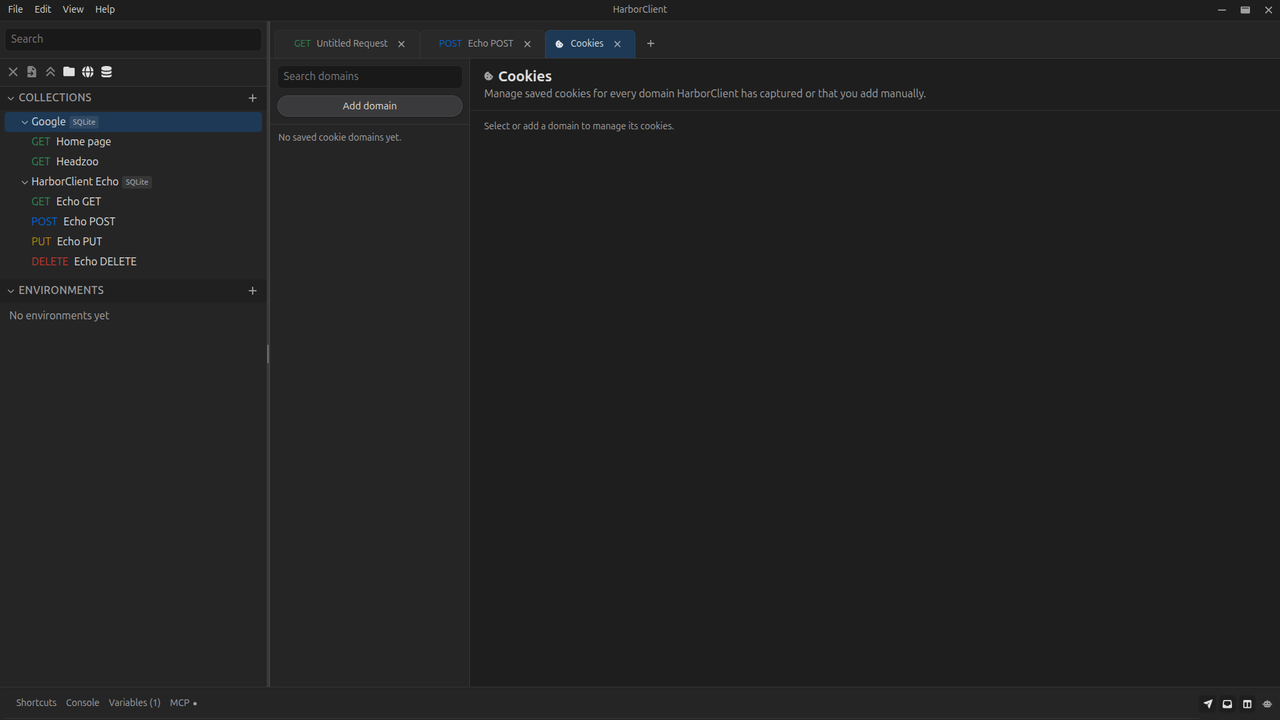
Open File → Cookies to manage saved cookies for every domain in one place. You can also edit cookies for the active request URL from the request editor Cookies tab.
Cookie jar behavior
| Behavior | Description |
|---|---|
| Storage | Cookies are persisted in the local registry, grouped by hostname (normalized to lowercase) |
| Outbound requests | Enabled cookie rows for the request host are serialized into a Cookie header at send time |
| Response capture | When a response includes Set-Cookie headers, HarborClient upserts or removes cookies for that response host |
| Secure cookies | Cookies marked Secure from Set-Cookie are sent only over HTTPS |
| Empty domains | When the last cookie for a domain is removed, the domain entry is dropped from the jar |
HarborClient does not implement full browser cookie rules (path, domain, SameSite, and so on). The jar stores name/value pairs per hostname for API testing workflows.
Managing cookies (File → Cookies)
File → Cookies opens a singleton page tab with a domain sidebar and a cookie editor for the selected host.
| Area | Purpose |
|---|---|
| Search domains | Filter the domain list |
| Add domain | Enter a hostname or URL, then manage cookies for that host before any are saved |
| Domain list | Select a host to edit its cookies |
| Cookie rows | Add, edit, enable, or disable cookie name/value pairs |
| Delete domain | Remove all cookies for the selected host (confirmation required) |
Changes save immediately as you edit rows. Deleting every cookie row for a domain removes that domain from the sidebar list.
Cookies in the request editor
The request editor Cookies tab edits the same jar entry for the resolved request URL host (after {{variable}} substitution in the URL). Use it when you are focused on one request; use File → Cookies when you need a cross-domain view.
| Tab | Scope |
|---|---|
| Request editor → Cookies | Cookies for the current request URL host |
| File → Cookies | All saved domains and their cookies |
If the URL is blank or invalid, the Cookies tab prompts you to enter a valid URL first.
Automatic capture from responses
When you send a request and the server responds with Set-Cookie headers, HarborClient updates the jar for that response host:
- New or updated cookies — stored with the name and value from the header
- Expired cookies — removed when
Max-Age=0or anExpiresdate in the past is present - Secure flag — preserved from the header; secure cookies are omitted on plain HTTP sends
Captured cookies appear in File → Cookies and on the Cookies tab for matching hosts.
Cookies in request scripts
Pre- and post-request scripts can read and modify cookies for the current request host with hc.cookies.get(name), hc.cookies.set(name, value), and hc.cookies.clear(name).
The host is resolved from the request URL at send start. Changing hc.request.url mid-script does not retarget the cookie bag. Cookie changes from scripts persist to the jar when the send completes — the same storage as File → Cookies and the request editor Cookies tab.
See Request scripts — hc.cookies.
Backup and restore
Cookies in the jar are part of your local HarborClient data. They are included when you create a backup under Settings → Backup & Restore. See Settings — Backup & Restore for what is captured and what is not.
What's next
- Making requests — editor tabs, sending, and response capture
- Settings — backup, restore, and local data management
- AI assistant — the assistant can read and modify cookies for the active request when you ask