
Scripting
HarborClient lets you run JavaScript before and after each HTTP request. Scripts run in an isolated sandbox and use the global hc object to read and modify the outgoing request, set variables, and assert on the response.
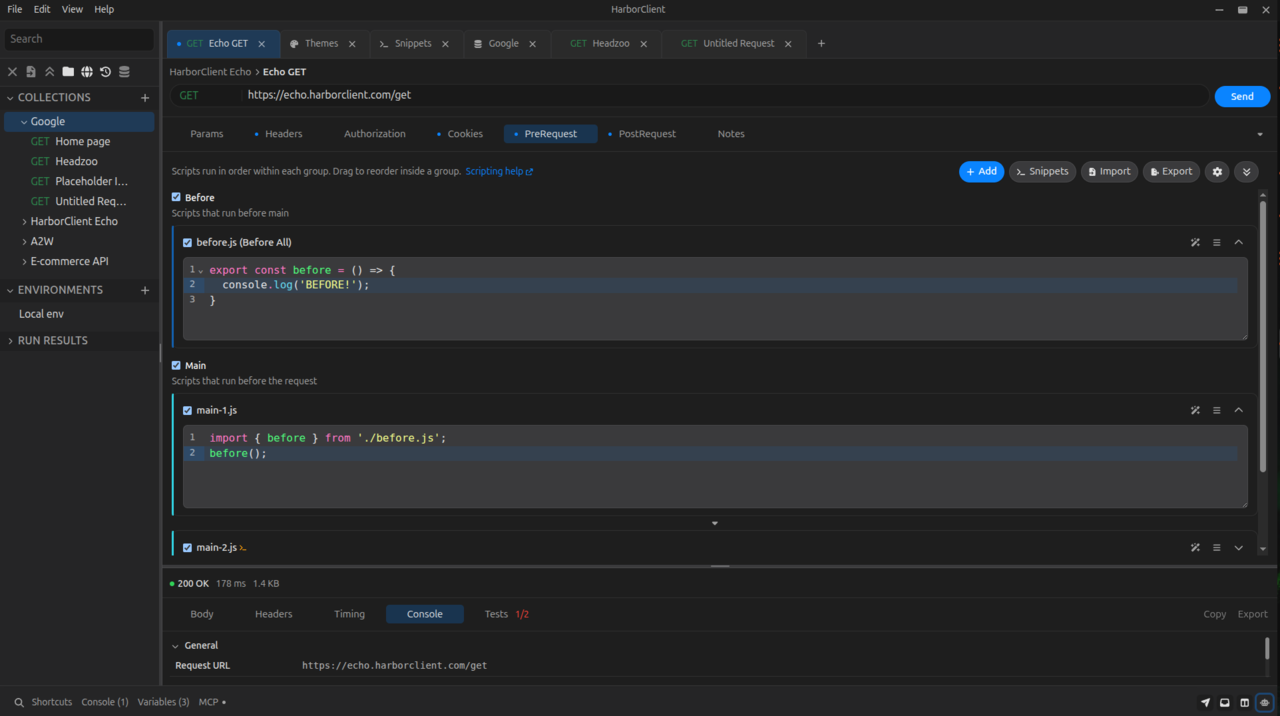
Scripts can be defined at two levels:
- Collection — in collection settings, under the PreRequest and PostRequest tabs. Each tab is a request stage with an ordered list of scripts that run for every request in the collection.
- Request — in the request editor, under the PreRequest and PostRequest tabs. Each tab is a request stage with an ordered list of scripts that run only for that saved request.
Both request stages use the same hc API and the same JavaScript sandbox.
Terminology: HarborClient has two request stages — pre-request and post-request — shown as the PreRequest and PostRequest tabs. Within each request stage, every script row also has a Stage value (Before all, Before each, Main, After each, or After all) that controls when it runs in that list.
Each PreRequest or PostRequest tab shows an ordered script list for that request stage. For each script you can:
- Enable or disable it with the checkbox (disabled scripts are skipped at send time)
- Rename it with the editable label (used in the send console)
- Expand or collapse the code editor
- Ask AI about the script with the wand icon (shown only when AI is available — a personal API key or a connected Team Hub with LLM models). Opens the AI sidebar, starts a new chat, and prefills the composer with a script reference token. See Ask AI about a script below.
- Reorder scripts by dragging when the list has two or more entries
- Add a new inline script (choose a Stage), Import a
.jsfile as a new snippet (opens the add-snippet dialog with imported source), or open Snippet library... to reference a saved snippet from Settings → Snippets or File → Snippets - Remove a script from the list
Ask AI about a script
Each script row in the request editor PreRequest and PostRequest tabs includes an Ask AI button (wand icon) in the row action bar when AI is configured. Use it to start a focused conversation about that specific script without copying its source into the chat yourself.
When you click Ask AI:
- The AI sidebar opens
- A fresh chat tab is created
- The message composer is prefilled with a reference token:
@<request-id>.<pre|post>.<index>| Token part | Meaning |
|---|---|
<request-id> | Saved request database id (for example 42), or active for an unsaved request tab |
<pre|post> | Request stage: pre for the pre-request stage, post for the post-request stage |
<index> | 1-based position in that request stage's script list (first script is 1) |
Add your prompt after the blank line and send. Example for saved request id 42, first pre-request script:
@42.pre.1

Write a test that checks the response status code is 200.
The assistant reads the referenced script from the active request, then applies changes to that script row. Post-request tests use hc.test with hc.response.to.have.status(200) or hc.expect(hc.response.code).to.equal(200) — not Postman pm syntax. See The hc object for the script API.
For quick in-editor help on inline scripts, type /ask in the script editor — see AI assistant — Inline /ask.
Limitations:
- Targets the request open in the active editor tab only; the
@reference must correspond to that tab - Inline scripts can be edited; snippet-linked rows cannot — the assistant reports that the snippet must be edited in Settings → Snippets
- Changes update the editor draft immediately but are not saved until you save the request
- Requires AI to be configured first — see AI assistant — API keys
For full AI sidebar usage, see AI assistant.
Multiple scripts
Each collection and request can define multiple scripts per request stage — an ordered list of up to 64 pre-request stage scripts and up to 64 post-request stage scripts. Use separate scripts to break setup and teardown into modular steps, toggle individual steps on and off, or mix inline code with shared snippets.
Within a request stage (collection or request scope), scripts run in a fixed order based on each script's Stage:
| Stage | When it runs |
|---|---|
| Before all | Once, before every other script in the list |
| Before each | Before every Main script |
| Main | Main script step (default) |
| After each | After every Main script |
| After all | Once, after every other script in the list |
The script list editor groups scripts into three sections — Before, Main, and After — matching those stages. Section headings appear only when scripts span two or more sections; a single-section list stays flat. Drag to reorder inside a section only. When you click Add, HarborClient asks which Stage to use. For inline scripts and local snippet references, pick a Stage from the row Actions menu — each option shows a checkmark on the current stage. Marketplace-installed snippet rows keep the publisher's default stage until you Clone the snippet. Save, edit, clone, delete, and stage changes live in each row's Actions menu.
Execution order for a list with two Main scripts looks like:
- All enabled Before all scripts (top to bottom)
- All enabled Before each scripts
- First Main script
- All enabled After each scripts
- All enabled Before each scripts again
- Second Main script
- All enabled After each scripts again
- All enabled After all scripts (top to bottom)
Before each and After each only run when at least one Main script exists. Before all and After all still run even when there are no Main scripts.
Variable values, hc.data mutations, and request mutations from earlier scripts in the same request stage are available to later scripts.
Snippets
Snippets are reusable JavaScript blocks stored app-wide under Settings → Snippets. Instead of copying the same code into many requests, add a snippet reference to a script list with Select snippet....
A snippet reference is a live pointer, not a copy of the code. When you edit a snippet in Settings, every script list that references it runs the updated code on the next send. If you delete a snippet, requests that referenced it show Missing snippet in the editor and skip that entry at send time.
Snippets are stored locally on your machine (in the app's local database). They are not embedded in collection or request export files. After importing a collection on another machine, recreate any needed snippets locally, import portable snippet JSON via File → Import, or replace snippet references with inline scripts. Git-backed storage locations also write snippet exports under snippets/ in the repository. See Settings — Snippets and Using snippets for managing the snippet library.
Importing snippets
You can also reuse snippet code with standard JavaScript import syntax inside inline scripts (and inside other snippets). This complements Select snippet… — use a script-list reference when the snippet should run as its own stage slot; use import when you want shared helpers without an extra list entry.
Importable names — only scripts or snippets whose display Name looks like a filename ending in .js can be imported. Examples: pass-testing.js, utils/format-date.js, or an inline script row named before.js. Human-readable names such as Pass Testing still work with Select snippet…, but cannot be import targets. Path segments may use letters, digits, dots, underscores, and hyphens; names must not start with / or contain ...
Import targets come from your snippet library and from inline scripts in the same request and its collection (pre- and post-request lists). A disabled inline script with an importable name remains importable as a helper-only module even when it does not run as its own slot.
Snippets export with ordinary ESM syntax (export function, export const, export default). A snippet can export helpers and include top-level code that runs when the snippet is used as a direct script slot.
Script editors autocomplete relative import paths after ./ — for example ./utils/ suggests folder segments and ./pass-testing.js suggests matching snippet files. When a snippet name is import-valid, Settings → Snippets shows a hint that other scripts may import it by filename; renaming may break existing imports.
At send time, HarborClient bundles relative ./…js imports against your snippet library and sibling inline scripts, then runs the result in the same SES sandbox as other scripts. Imported module top-level side effects run once per bundled script execution; module state does not persist across sends (use hc.data for structured data shared within one send).
Example — helper snippet (pass-testing.js in Settings → Snippets):
export function passTest(value) {
  hc.test("value is truthy", () => {
    hc.expect(value).to.be.true;
  });
}
Example — consuming inline script (imports a library snippet or a sibling inline script such as before.js):
import { before } from "./before.js";

before();
Nested paths work the same way: a snippet named utils/format-date.js is imported with import { formatDate } from "./utils/format-date.js".
Not supported yet: bare package imports such as import lodash from "lodash". npm packages and require are planned for a later release. Duplicate importable names (library snippets or inline scripts) produce an ambiguous-import error at send time.
Execution order
When you send a request, scripts run in this order:
- Each enabled collection pre-request script, in list order
- Each enabled request pre-request script, in list order
- HTTP request is sent
- Each enabled collection post-request script, in list order
- Each enabled request post-request script, in list order
Disabled scripts, blank inline scripts, and missing snippet references are skipped. Within each request stage, variable values and hc.data from earlier scripts are available to later scripts and to {{variable}} substitution when the request is sent. Each executed script has its own timeout (default 5000 ms, configurable in Settings → General as Script timeout (ms); set to 0 to disable). Timeout applies per script in the run order, not per send. Console output is prefixed with the script label.
The hc object
All script APIs are exposed on the global hc object. The editor provides autocomplete for hc members; keep your script code aligned with the reference below.
Plugins use the same hc name with a broader API for UI contributions, storage, and HTTP hooks. Plugin APIs are not available inside collection or request scripts.
hc.request
Read and write the outgoing request. Available in both pre- and post-request scripts. Changes made in pre-request scripts affect the request that is sent; changes in post-request scripts do not re-send the request.
hc.request.method
Type: string (get/set)
HTTP method for the request (for example GET, POST).
hc.request.method = "POST";hc.request.url
Type: string (get/set)
Request URL. Setters coerce the value to a string.
hc.request.url = "https://api.example.com/v1/users";hc.request.body
Type: string (get/set)
Request body as text. Setters coerce the value to a string.
hc.request.body = JSON.stringify({ name: "Ada" });hc.request.headers
Parameter bag for the request-level header list (not collection-level headers). Changes affect the outgoing request for this send only — they are not persisted to the saved request. Header keys are matched case-insensitively.
hc.request.headers.get()
Signature: () => Record<string, string>
Returns a plain object of all enabled headers with non-empty keys. Header names are preserved as stored.
var headers = hc.request.headers.get();
console.log(headers["Content-Type"]);
hc.request.headers.get(key)
Signature: (key: string) => string | undefined
Returns the value of the first enabled header whose name matches key case-insensitively. Returns undefined if no matching header exists.
var auth = hc.request.headers.get("Authorization");hc.request.headers.set(entries)
Signature: (entries: Record<string, unknown>) => void
Batch-upserts multiple headers. Each key is updated in place or appended as a new enabled row.
hc.request.headers.set({
  Authorization: "Bearer " + hc.request.variables.get("token"),
  "X-Request-Id": hc.request.variables.get("requestId"),
});
hc.request.headers.set(key, value)
Signature: (key: string, value: unknown) => void
Updates the value of an existing enabled header with the same name (case-insensitive), or appends a new enabled header if none exists. Values are coerced to strings.
hc.request.headers.set(
  "Authorization",
  "Bearer " + hc.request.variables.get("token")
);
hc.request.headers.clear()
Signature: () => void
Removes all request-level headers for the remainder of this send.
hc.request.headers.clear();hc.request.params
Parameter bag for the request query params list. Changes affect the outgoing request for this send only — they are not persisted to the saved request. Param keys are matched case-sensitively.
hc.request.params.get()
Signature: () => Record<string, string>
Returns a plain object of all enabled query params with non-empty keys.
var params = hc.request.params.get();
console.log(params.page);
hc.request.params.get(key)
Signature: (key: string) => string | undefined
Returns the value of the first enabled param whose key matches exactly. Returns undefined if no matching param exists.
var page = hc.request.params.get("page");hc.request.params.set(entries)
Signature: (entries: Record<string, unknown>) => void
Batch-upserts multiple query params.
hc.request.params.set({
  page: "2",
  limit: "50",
});
hc.request.params.set(key, value)
Signature: (key: string, value: unknown) => void
Updates an existing enabled param or appends a new one. Values are coerced to strings.
hc.request.params.set("page", "2");hc.request.params.clear()
Signature: () => void
Removes all request query params for the remainder of this send.
hc.request.params.clear();hc.request.notes
Accessor for the request tags and comment fields shown in the Notes tab. Changes persist to the saved request when the send completes (when the request has been saved). Tags are normalized the same way as the Notes tab editor.
hc.request.notes.get()
Signature: () => { tags: string, comment: string }
Returns the current tags and comment strings.
var notes = hc.request.notes.get();
console.log(notes.tags, notes.comment);
hc.request.notes.get(field)
Signature: (field: 'tags' | 'comment') => string
Returns a single notes field.
var tags = hc.request.notes.get("tags");hc.request.notes.set(entries)
Signature: (entries: { tags?: unknown, comment?: unknown }) => void
Batch-updates one or both notes fields. Omitted fields are left unchanged.
hc.request.notes.set({
  tags: "smoke, api",
  comment: "Validated by pre-request script",
});
hc.request.notes.set(field, value)
Signature: (field: 'tags' | 'comment', value: unknown) => void
Updates a single notes field. Values are coerced to strings.
hc.request.notes.set("comment", "Hello world");hc.request.notes.clear()
Signature: () => void
Clears both tags and comment ('' for each).
hc.request.notes.clear();hc.request.auth
Read and write request-level authorization for the current send. Available in pre- and post-request scripts. Changes from pre-request scripts affect the outgoing request for this send only — they are not persisted to the saved request (same as hc.request.headers and hc.request.params). Use the Authorization tab or save credentials in variables when you need durable configuration.
When request auth type is None, collection authorization still applies at send time. See Making requests — Authorization.
hc.request.auth.get()
Signature: () => object
Returns a plain snapshot of the current auth configuration. Shape depends on auth type:
type | Fields |
|---|---|
none | { type: 'none' } |
basic | { type: 'basic', username, password } |
bearer | { type: 'bearer', token } |
oauth2 | { type: 'oauth2', tokenUrl, clientId, clientSecret, scope, audience, clientAuth } |
hc.request.auth.set(input)
Signature: (input: object) => void
Merges auth fields from a partial flat object onto the current configuration. Switching type preserves credential values stored for other types (matching the Authorization tab). Supported fields: type, token, username, password, tokenUrl, clientId, clientSecret, scope, audience, clientAuth (body or header).
hc.request.auth.set({
  type: "bearer",
  token: hc.request.variables.get("token"),
});
hc.request.auth.set({ type: "bearer", token: "{{idToken}}" });
hc.request.auth.update(field, value)
Signature: (field: string, value: unknown) => void
Updates a single auth field. Same field names as set.
hc.request.auth.update("token", "new-token");
hc.request.auth.update("type", "none");
hc.request.variables
Get and set variables for the current send. Collection variables are loaded at the start of the send; values set with hc.request.variables.set are ephemeral and apply only to the current send (they are not persisted to the collection).
Variables can be referenced elsewhere with {{key}} syntax in URLs, headers, params, body, and script source. Script source is substituted before each script runs, so a variable set in an earlier script is available to later scripts and to the outgoing request.
hc.request.variables.get(key)
Signature: (key: string) => string | undefined
Returns the session value set during this send (via hc.request.variables.set) if present; otherwise returns the collection variable value. Returns undefined if the key is not set.
var token = hc.request.variables.get("token");hc.request.variables.set(key, value)
Signature: (key: string, value: string) => void
Sets an ephemeral variable for the remainder of this send. Values are coerced to strings.
hc.request.variables.set("token", "abc123");
hc.request.variables.set("timestamp", String(Date.now()));
hc.request.variables.clear(key)
Signature: (key: string) => void
Removes a variable for the remainder of this send. Cleared keys return undefined from get and are left unchanged in replaceIn templates. Session-only — not persisted to the collection, environment, or globals.
hc.request.variables.clear("token");hc.request.variables.replaceIn(template)
Signature: (template: string) => string
Replaces {{key}} placeholders in a string using the same resolution order as send-time substitution: session values set with hc.request.variables.set, then merged runtime variables (collection and environment), then dynamic variables such as {{$guid}} and {{$randomEmail}}. Unknown tokens are left unchanged. See Variables for the full dynamic variable list.
hc.request.url = hc.request.variables.replaceIn(
  "https://api.example.com/users/{{$guid}}"
);
console.log(hc.request.variables.replaceIn("Bearer {{token}}"));
hc.collection
Collection metadata, variables, headers, and authorization for the request's owning collection. Available when the request belongs to a collection; id is null and name is empty when there is no collection.
Changes to hc.collection.variables, hc.collection.headers, and hc.collection.auth apply to the current send and persist to the collection when the send completes (unlike hc.request.variables.set, which is ephemeral).
hc.collection.id
Type: number | null (read-only)
Storage id of the collection, or null when the request has no collection.
console.log("Collection id:", hc.collection.id);hc.collection.name
Type: string (read-only)
Display name of the collection the request belongs to. Empty string when the request has no collection.
console.log("Collection:", hc.collection.name);hc.collection.variables
Get and set collection variables for the current send. Collection variables can be referenced elsewhere with {{key}} syntax in URLs, headers, params, body, and script source.
hc.collection.variables.get(key)
Signature: (key: string) => string | undefined
Returns the value set during this send (via hc.collection.variables.set) if present; otherwise returns the merged runtime variable value (collection and environment). Returns undefined if the key is not set.
var token = hc.collection.variables.get("token");hc.collection.variables.set(key, value)
Signature: (key: string, value: string) => void
Sets a collection variable for the remainder of this send and persists it to the collection when the send completes. Values are coerced to strings. New keys are added to the collection with an empty default and share: false.
hc.collection.variables.set("token", "abc123");
hc.collection.variables.set("timestamp", String(Date.now()));
hc.collection.variables.clear(key)
Signature: (key: string) => void
Removes a collection variable by key. The key is deleted from the collection when the send completes.
hc.collection.variables.clear("token");hc.collection.headers
Parameter bag for collection-level headers sent with every request in the collection. Header values support {{variable}} syntax. Changes apply to the current send and are persisted to the collection after the send completes. Header keys are matched case-insensitively.
Request-level headers override collection headers when both define the same header name (case-insensitive).
hc.collection.headers.get()
Signature: () => Record<string, string>
Returns a plain object of all enabled collection headers with non-empty keys.
var headers = hc.collection.headers.get();
console.log(headers["Content-Type"]);
hc.collection.headers.get(key)
Signature: (key: string) => string | undefined
Returns the value of the first enabled collection header whose name matches key case-insensitively. Returns undefined if no matching header exists.
var auth = hc.collection.headers.get("Authorization");hc.collection.headers.set(entries)
Signature: (entries: Record<string, unknown>) => void
Batch-upserts multiple collection headers. Persisted to the collection when the send completes.
hc.collection.headers.set({
  Authorization: "Bearer " + hc.collection.variables.get("token"),
  "X-Api-Version": "2",
});
hc.collection.headers.set(key, value)
Signature: (key: string, value: unknown) => void
Updates an existing enabled collection header or appends a new one. Persisted to the collection when the send completes.
hc.collection.headers.set(
  "Authorization",
  "Bearer " + hc.collection.variables.get("token")
);
hc.collection.headers.clear()
Signature: () => void
Removes all collection headers for the remainder of this send. The empty list is persisted when the send completes.
hc.collection.headers.clear();hc.collection.auth
Read and write collection-level authorization for the current send. Same get, set, and update API as hc.request.auth. Changes apply on send and persist to the collection when the send completes.
hc.collection.auth.get()
Signature: () => object
Returns the same flat auth snapshot shape as hc.request.auth.get().
var auth = hc.collection.auth.get();
console.log(auth);
hc.collection.auth.set(input)
Signature: (input: object) => void
Merges collection auth fields from a partial flat object. Persisted to the collection when the send completes.
hc.collection.auth.set({
  type: "bearer",
  token: hc.collection.variables.get("token"),
});
hc.collection.auth.set({ type: "bearer", token: "{{idToken}}" });
hc.collection.auth.update(field, value)
Signature: (field: string, value: unknown) => void
Updates a single auth field on the collection configuration. Persisted when the send completes.
hc.collection.auth.update("type", "none");
hc.collection.auth.update("token", "{{idToken}}");
hc.globals
Get and set app-wide global variables. Values set with hc.globals.set are persisted to Settings → Globals after the send completes (unlike hc.request.variables.set, which is ephemeral).
Global variables can be referenced elsewhere with {{key}} syntax in URLs, headers, params, body, and script source.
hc.globals.get(key)
Signature: (key: string) => string | undefined
Returns the value set during this send (via hc.globals.set) if present; otherwise returns the merged runtime variable value (global, collection, and environment). Returns undefined if the key is not set.
var baseUrl = hc.globals.get("baseUrl");hc.globals.set(key, value)
Signature: (key: string, value: string) => void
Sets a global variable for the remainder of this send and persists it to app settings when the send completes. Values are coerced to strings. New keys are added with an empty default and share: false.
hc.globals.set("baseUrl", "https://api.example.com");hc.globals.clear(key)
Signature: (key: string) => void
Removes a global variable by key. The key is deleted from Settings → Globals when the send completes.
hc.globals.clear("baseUrl");hc.environment
Read and write variables on the active environment. When no environment is selected, hc.environment.name is an empty string and variable sets apply to the current send only (they are not persisted).
hc.environment.name
Type: string (read-only)
Display name of the active environment. Empty string when no environment is selected.
console.log("Environment:", hc.environment.name);hc.environment.variables.get(key)
Signature: (key: string) => string | undefined
Returns the value set during this send (via hc.environment.variables.set) if present; otherwise returns the merged runtime variable value (collection and environment). Returns undefined if the key is not set.
var token = hc.environment.variables.get("token");hc.environment.variables.set(key, value)
Signature: (key: string, value: string) => void
Sets an environment variable for the remainder of this send and persists it to the active environment when the send completes. Values are coerced to strings. New keys are added to the environment with an empty default and share: false. When no environment is active, the value applies to the send only.
hc.environment.variables.set("token", "abc123");
hc.environment.variables.set("timestamp", String(Date.now()));
hc.environment.variables.set("timestamp", String(Date.now()));
#### hc.environment.variables.clear(key)

**Signature:** `(key: string) => void`

Removes an environment variable by key. The key is deleted from the active environment when the send completes.

```javascript
hc.environment.variables.clear("token");
hc.cookies
Get, set, and clear cookies for the request host resolved at send start. Available in pre- and post-request scripts. The host comes from the request URL before scripts run; changing hc.request.url mid-script does not retarget this bag.
Cookie changes persist to the cookie jar when the send completes.
hc.cookies.get(name)
Signature: (name: string) => string | undefined
Returns the cookie value for name (case-insensitive). Returns undefined when the cookie is absent or was cleared during this send.
var session = hc.cookies.get("session_id");hc.cookies.set(name, value)
Signature: (name: string, value: string) => void
Sets a cookie for the request host. Values are coerced to strings. New cookies are enabled by default.
hc.cookies.set("session_id", "abc123");hc.cookies.clear(name)
Signature: (name: string) => void
Removes a cookie by name for the request host. Persisted to the jar when the send completes.
hc.cookies.clear("session_id");hc.data
Type: Record<string, unknown> (get/set)
Mutable object bag for sharing structured, ephemeral data between scripts within one send. Starts as {} at the beginning of each send and threads through every script slot in execution order: collection pre-request → request pre-request → HTTP send → collection post-request → request post-request. Resets to {} on the next send.
Use hc.data for objects, arrays, mock fixtures, and other non-string state you want later scripts in the same send to read. Use variable bags when you need string values, {{key}} substitution in URLs/headers/body, or persistence to collection/environment/globals after the send.
You can mutate properties in place (hc.data.mocks = { user: { id: 123 } }) or replace the whole object (hc.data = { replaced: true }). Only structured data is supported — functions, class instances, and other non-cloneable values are not intended for this bag.
hc.data (get)
Returns the current data object. Mutations on the returned object are visible to later scripts in the same send.
hc.data.mocks = { user: { id: 123, name: "Ada" } };
hc.data.token = "abc";
hc.data (set)
Replaces the entire data object. Non-object values reset the bag to {}.
hc.data = { mocks: { user: { id: 123 } } };Post-request script reading data set in an earlier pre-request script:
const user = hc.data.mocks.user;
hc.test("mock user name", function () {
  hc.expect(user.name).to.equal("Ada");
});
hc.sendRequest(req)
Signature: (req: object) => Promise<object>
Sends an outbound HTTP request from the script sandbox. Disabled by default. Enable Allow script network requests in Settings → General before calling this API.
Use await — scripts are evaluated as async functions, so top-level await hc.sendRequest(...) is supported.
The request object supports:
| Field | Description |
|---|---|
url | Required. Target URL. |
method | HTTP method (default GET). |
headers | Array of { key, value, enabled? } objects or a plain { "Header-Name": "value" } map. |
params | Array of { key, value, enabled? } query parameters. |
body | Request body text. |
bodyType | none, json, text, multipart, or urlencoded (default none). |
Script-initiated sends use the same HTTP stack as the Requester — general settings for timeout, SSL verification, proxy, and redirects apply. Cookies from the jar are attached when the target host matches; Set-Cookie responses update the jar.
The returned promise resolves to a response object:
| Property / method | Description |
|---|---|
code | HTTP status code |
status | Status text |
headers | Flat header map |
responseTime | Round-trip time in milliseconds |
text() | Response body as string |
json() | Parses JSON; throws on invalid JSON |
var login = await hc.sendRequest({
  url: "https://api.example.com/login",
  method: "POST",
  headers: { "Content-Type": "application/json" },
  body: JSON.stringify({ user: "ada", pass: "secret" }),
  bodyType: "json",
});

hc.request.variables.set("token", login.json().token);
When the setting is disabled or the API is unavailable in the current context, hc.sendRequest throws.
hc.execution
Control collection run flow. Available in pre- and post-request scripts during a collection run.
hc.execution.setNextRequest(name)
Signature: (name: string | null) => void
After the current request finishes, jump to the saved request with that name in the run order. Pass null to stop the run. When the name does not match any request in the run, HarborClient falls back to the next request in order.
if (hc.response.code === 401) {
  hc.execution.setNextRequest("Refresh Token");
}
hc.execution.skipRequest()
Signature: () => void
Skip the HTTP send for the current request. Pre-request scripts still run; post-request scripts still run against a skipped placeholder. On a manual send outside the collection runner, the active tab shows a skipped response instead of sending HTTP.
if (!hc.request.variables.get("runThisStep")) {
  hc.execution.skipRequest();
}
hc.info
Read-only. Postman-compatible metadata about the current script run. Available in pre- and post-request scripts.
| Property | Type | Description |
|---|---|---|
eventName | "prerequest" | "test" | "prerequest" during pre-request scripts; "test" during post-request scripts |
requestName | string | Display name of the saved request |
requestId | string | Saved request database id as a string; empty when the tab is unsaved |
iteration | number | Collection run iteration index (0 for manual sends and non-data-driven runs) |
console.log(hc.info.eventName, hc.info.requestName, hc.info.requestId);
if (hc.info.eventName === "test") {
  hc.test("ran for " + hc.info.requestName, function () {
    hc.expect(hc.info.requestId).to.be.ok;
  });
}
hc.test(name, fn)
Signature: (name: string, fn: () => void) => void
Registers a named test. If fn completes without throwing, the test passes. If fn throws (including failed hc.expect assertions), the test fails and the error message is recorded.
Tests are most useful in post-request scripts. Results appear in the response viewer Tests tab after the send completes.
hc.test("status is 200", function () {
  hc.response.to.have.status(200);
});
For Postman-style response checks (status, headers, body, JSON), prefer hc.response.to. Use hc.expect(actual) when asserting on arbitrary values.
hc.expect(actual)
Signature: (actual: unknown, message?: string) => Assertion
Returns a Chai.js BDD assertion helper for use inside hc.test. Failed assertions throw with a descriptive message. HarborClient uses the same assertion library Postman bundles for pm.expect.
Pass an optional second argument to customize the failure message:
hc.expect(hc.response.code, "expected success status").to.equal(200);See the Chai BDD API reference for the full matcher list. Common matchers:
hc.expect(actual).to.equal(expected)
Strict equality (===). Use for primitives and reference checks.
hc.expect(hc.response.code).to.equal(200);
hc.expect(hc.response.status).to.equal("OK");
hc.expect(actual).to.eql(expected)
Deep equality. Use for objects and arrays. Key order does not matter.
hc.expect(hc.response.json()).to.eql({ ok: true });hc.expect(actual).to.include(value)
Asserts that actual contains value — works on strings, arrays, and objects.
hc.expect(hc.response.text()).to.include('"ok":true');
hc.expect(hc.response.json().items).to.include("active");
hc.expect(actual).to.be.ok
Asserts that actual is truthy.
hc.expect(hc.response.headers["content-type"]).to.be.ok;Additional examples:
hc.expect(hc.response.code).to.be.oneOf([200, 201, 204]);
hc.expect(hc.response.status).to.be.a("string");
hc.expect(hc.response.json()).to.have.property("id");
hc.response
Available in post-request scripts only. Not defined during pre-request scripts.
Read-only access to the HTTP response from the send that just completed. For Postman-style assertions on status, headers, and body, use hc.response.to inside hc.test.
hc.response.code
Type: number (read-only)
HTTP status code (for example 200, 404). Maps to the response status field.
hc.expect(hc.response.code).to.equal(200);hc.response.status
Type: string (read-only)
HTTP status text (for example OK, Not Found).
console.log(hc.response.status);hc.response.headers
Type: Record<string, string> (read-only)
Response headers as a flat key-value map.
var contentType = hc.response.headers["content-type"];hc.response.responseTime
Type: number (read-only)
Round-trip time for the request in milliseconds.
hc.test("responds quickly", function () {
  hc.expect(hc.response.responseTime < 1000).to.be.ok;
});
hc.response.text()
Signature: () => string
Returns the response body as a string.
var body = hc.response.text();hc.response.json()
Signature: () => unknown
Parses the response body as JSON and returns the result. Throws if the body is not valid JSON.
var data = hc.response.json();
hc.expect(data.id).to.be.ok;
hc.response.document()
Signature: () => { querySelector, querySelectorAll }
Parses the response body as HTML and returns a document object for CSS selector queries. The parser is Cheerio-backed; this is not a full browser DOM.
Availability: post-request scripts only.
The first call in a script parses the body; later calls reuse the same parsed document.
Document methods:
| Method | Returns | Description |
|---|---|---|
querySelector(selector) | element or null | First match for a CSS selector |
querySelectorAll(selector) | array of elements | Every match for a CSS selector |
Element properties:
| Property / method | Description |
|---|---|
textContent | Concatenated text of the element and its descendants |
getAttribute(name) | Attribute value, or null when absent |
innerHTML | Serialized inner HTML of the element's children |
Limitations:
- CSS selectors only (no XPath)
- No script execution and no network fetches during parse
- Parses whatever body string the response contains; does not check
Content-Type - Not a browser
Document— elements have no nestedquerySelector, and there is no Cheerio$()API
var doc = hc.response.document();

hc.test("page has login form", function () {
  var form = doc.querySelector("form#login");
  hc.expect(form).to.be.ok;
  hc.expect(form.getAttribute("method")).to.equal("post");
});

hc.test("lists three items", function () {
  hc.expect(doc.querySelectorAll("ul.items li").length).to.equal(3);
});
hc.response.to
Available in post-request scripts only. Postman-style response assertions powered by Chai. Use inside hc.test:
hc.test("status is 200", function () {
  hc.response.to.have.status(200);
});

hc.test("status text", function () {
  hc.response.to.have.status("OK");
});

hc.test("not found", function () {
  hc.response.to.not.have.status(404);
});

hc.test("returns JSON", function () {
  hc.response.to.be.json;
});

hc.test("body shape", function () {
  hc.response.to.have.jsonBody({ ok: true });
});
Methods on hc.response.to.have:
| Matcher | Description |
|---|---|
status(code) | Assert HTTP status code (number) |
status(text) | Assert status text (string, case-insensitive) |
header(name) | Assert header is present |
header(name, value) | Assert header value |
body() | Assert body is non-empty |
body(text) | Assert exact body text |
body(/regex/) | Assert body matches regex |
jsonBody() | Assert body parses as JSON |
jsonBody(object) | Assert parsed JSON deeply equals object |
Properties on hc.response.to.be:
| Property | Description |
|---|---|
json | Content-Type includes JSON and body parses |
withBody | Body is non-empty |
ok / success | Status is 2xx |
redirection | Status is 3xx |
clientError | Status is 4xx |
serverError | Status is 5xx |
error | Status is 4xx or 5xx |
accepted | Status is 202 |
badRequest | Status is 400 |
unauthorized | Status is 401 |
forbidden | Status is 403 |
notFound | Status is 404 |
rateLimited | Status is 429 |
Not supported on hc.response.to: jsonSchema (requires ajv), JSON-path form jsonBody(path, value). For response time, use hc.expect(hc.response.responseTime).to.be.below(ms).
console
Scripts can log output with a limited console object. Log lines are captured and shown in the send console after the request completes.
console.log(...args)
Signature: (...args: unknown[]) => void
Logs one or more values. Non-string arguments are JSON-stringified; arguments are joined with spaces.
console.log("token set:", hc.request.variables.get("token"));console.error(...args)
Signature: (...args: unknown[]) => void
Same as console.log, but each line is prefixed with [error].
console.error("missing token");What gets applied back
After each script runs, HarborClient applies these changes:
| Change | Applied to sent request | Persists to saved request |
|---|---|---|
hc.request.method, url, body | Yes (pre scripts only) | No (current send only) |
hc.request.headers / hc.request.params | Yes (pre scripts only) | No (current send only) |
hc.request.notes | N/A (not sent over HTTP) | Yes (tags and comment on saved request) |
hc.request.auth.set / update | Yes (pre scripts only) | No (current send only) |
hc.request.variables.set | Yes (via {{key}} substitution) | No (session only) |
hc.request.variables.clear | Yes (via {{key}} substitution) | No (session only) |
hc.collection.variables.set | Yes (via {{key}} substitution) | Yes (collection variables) |
hc.collection.variables.clear | Yes (via {{key}} substitution) | Yes (collection variables) |
hc.collection.headers | Yes (collection headers on send) | Yes (collection headers) |
hc.collection.auth.set / update | Yes (collection auth on send) | Yes (collection authorization) |
hc.environment.variables.set | Yes (via {{key}} substitution) | Yes (active environment variables) |
hc.environment.variables.clear | Yes (via {{key}} substitution) | Yes (active environment variables) |
hc.globals.set | Yes (via {{key}} substitution) | Yes (app global variables) |
hc.globals.clear | Yes (via {{key}} substitution) | Yes (app global variables) |
hc.cookies.set / clear | Yes (Cookie header on send) | Yes (cookie jar for request host) |
hc.data mutations | N/A | No (session only) |
hc.execution.skipRequest | Skips HTTP send when set in pre | N/A |
hc.execution.setNextRequest | N/A on manual send | Controls next step in collection run only |
hc.sendRequest | Separate outbound HTTP | N/A (does not modify the active request) |
hc.test results | N/A | Shown in response viewer |
console.log / console.error | N/A | Shown in send console |
Request body type is not modified by scripts. Post-request changes to hc.request do not trigger a second send.
Variable resolution order for hc.request.variables.get:
- Value set with
hc.request.variables.setduring this send - Active environment variable value (or default if the value is empty)
- Collection variable value (or default if the value is empty)
- Global variable value (or default if the value is empty)
Variable resolution order for hc.collection.variables.get:
- Value set with
hc.collection.variables.setduring this send - Merged runtime variable value (global, collection, and environment, same order as above)
Variable resolution order for hc.environment.variables.get:
- Value set with
hc.environment.variables.setduring this send - Merged runtime variable value (global, collection, and environment, same order as above)
Variable resolution order for hc.globals.get:
- Value set with
hc.globals.setduring this send - Merged runtime variable value (global, collection, and environment, same order as above)
See Environments for how global, collection, and environment variables are merged at send time.
Sandbox limits
Scripts run in an isolated SES sandbox in a dedicated utility process:
- Timeout: each enabled script in a list gets its own limit (default 5000 ms). Configure Script timeout (ms) in Settings → General; set to
0to disable. A send with multiple scripts can use up to the sum of each script's limit. Eachawait hc.sendRequest(...)call counts toward the same script timeout. - Network: scripts cannot open arbitrary network connections. Outbound HTTP is available only through
await hc.sendRequest(...)when Allow script network requests is enabled in Settings → General. There is no filesystem access,require, or browser DOM. - Language: modern JavaScript (scripts are transpiled with esbuild and evaluated as async functions). Top-level
awaitis supported. Relative snippet imports (import … from './snippet-name.js') are supported; bare npm package imports andrequireare not supported yet. - Globals: only
hc,console, and standard JavaScript globals are available
If a script throws or times out, the error is recorded and the send continues with the last known request state. Syntax errors and runtime exceptions surface in the send console.
Examples
Pre-request: set URL, header, and token
Runs before the request is sent. Sets the target URL, attaches an auth header, and stores a token for {{token}} substitution elsewhere.
hc.request.url = "https://api.example.com/v1/users";
hc.request.method = "GET";
hc.request.variables.set("token", "abc123");
hc.request.headers.set(
  "Authorization",
  "Bearer " + hc.request.variables.get("token")
);
console.log("pre-request ran");
Post-request: assert status and JSON body
Runs after the response is received. Registers tests that appear in the Tests tab.
hc.test("status is 200", function () {
  hc.expect(hc.response.code).to.equal(200);
});

hc.test("body has ok", function () {
  hc.expect(hc.response.json()).to.eql({ ok: true });
});
Post-request: assert HTML response
Runs after an HTML response is received. Uses hc.response.document() to query the body without regex or string parsing.
hc.test("status is 200", function () {
  hc.expect(hc.response.code).to.equal(200);
});

var doc = hc.response.document();

hc.test("page title", function () {
  hc.expect(doc.querySelector("h1")?.textContent).to.equal("Welcome");
});

hc.test("item count", function () {
  hc.expect(doc.querySelectorAll(".item").length).to.equal(3);
});
Chain variables across collection and request scripts
Use separate inline scripts at each level. The collection script runs first and sets a variable; the request script reads it when building the URL. For objects, arrays, or mock fixtures, prefer hc.data instead of serializing JSON into a variable string.
Collection pre-request script (first script in the collection PreRequest list):
hc.request.variables.set("baseUrl", "https://api.example.com");Request pre-request script (first script in the request PreRequest list):
hc.request.url = hc.request.variables.get("baseUrl") + "/v1/status";The request URL becomes https://api.example.com/v1/status when sent.
Share mock data across scripts
Use hc.data when one script defines structured state and another script in the same send consumes it. The bag carries from pre-request scripts through post-request scripts for that send.
Collection or request pre-request script (define mocks):
hc.data.mocks = {
  user: { id: 123, name: "Ada" },
  items: ["alpha", "beta"],
};
Request or collection post-request script (use mocks in tests):
const user = hc.data.mocks.user;
hc.test("mock user id", function () {
  hc.expect(user.id).to.equal(123);
});
hc.test("mock item count", function () {
  hc.expect(hc.data.mocks.items.length).to.equal(2);
});
Pre-request: fetch a token with hc.sendRequest
Requires Allow script network requests in Settings → General.
var res = await hc.sendRequest({
  url: "https://api.example.com/oauth/token",
  method: "POST",
  body: JSON.stringify({ grant_type: "client_credentials" }),
  bodyType: "json",
});

hc.request.variables.set("token", res.json().access_token);
hc.request.auth.set({
  type: "bearer",
  token: hc.request.variables.get("token"),
});
Migrating from Postman
When you import a Postman collection, HarborClient copies pre-request and post-request script text into the collection and request settings verbatim as one inline script per request stage. Postman scripts use the global pm object; HarborClient scripts use hc. There is no pm compatibility layer — any pm.* reference throws pm is not defined at runtime.
After import, open each script and rewrite it against the hc API described above. You can split a long imported script into multiple list entries or replace repeated blocks with snippets. The sections below map common Postman patterns to HarborClient equivalents and call out features that have no direct replacement.
pm to hc API mapping
Postman (pm) | HarborClient (hc) | Notes |
|---|---|---|
pm.variables.get(key) / pm.variables.set(key, value) | hc.request.variables.get(key) / hc.request.variables.set(key, value) | Session-only; not persisted after the send |
pm.variables.unset(key) | hc.request.variables.clear(key) | Session-only clear |
pm.variables.replaceIn(template) | hc.request.variables.replaceIn(template) | Resolves {{key}}, runtime vars, and dynamic {{$name}} tokens |
pm.environment.get(key) / pm.environment.set(key, value) | hc.environment.variables.get(key) / hc.environment.variables.set(key, value) | Persists to the active environment when one is selected |
pm.environment.unset(key) | hc.environment.variables.clear(key) | Removes key from active environment after send |
pm.collectionVariables.get(key) / pm.collectionVariables.set(key, value) | hc.collection.variables.get(key) / hc.collection.variables.set(key, value) | Persists to the collection after the send |
pm.collectionVariables.unset(key) | hc.collection.variables.clear(key) | Removes key from collection after send |
pm.globals.get(key) / pm.globals.set(key, value) | hc.globals.get(key) / hc.globals.set(key, value) | Persists to app global variables after the send |
pm.globals.unset(key) | hc.globals.clear(key) | Removes key from globals after send |
postman.setEnvironmentVariable(key, value) | hc.environment.variables.set(key, value) | Legacy Postman alias |
postman.setGlobalVariable(key, value) | hc.globals.set(key, value) | Legacy Postman alias; persists to globals after the send |
pm.cookies.get(name) / pm.cookies.set(name, value) | hc.cookies.get(name) / hc.cookies.set(name, value) | Scoped to request host at send start; persists to cookie jar |
pm.cookies.unset(name) / pm.cookies.clear(name) | hc.cookies.clear(name) | Removes cookie for request host after send |
pm.sendRequest(options, callback) | await hc.sendRequest({ url, method, headers, body, ... }) | Opt-in via Settings → General; use async/await, not callbacks |
pm.execution.setNextRequest(name) / pm.execution.setNextRequest(null) | hc.execution.setNextRequest(name) / hc.execution.setNextRequest(null) | Collection runner only; null stops the run |
pm.execution.skipRequest() | hc.execution.skipRequest() | Skips HTTP send; runner marks step Skipped |
pm.info.eventName | hc.info.eventName | "prerequest" or "test" |
pm.info.requestName | hc.info.requestName | Saved request display name |
pm.info.requestId | hc.info.requestId | Saved id as string; empty when unsaved |
pm.info.iteration | hc.info.iteration | 0 unless data-driven collection iterations are supported |
pm.request.method | hc.request.method | Get/set |
pm.request.url | hc.request.url | Get/set |
pm.request.body (raw mode) | hc.request.body | Get/set as text |
pm.request.headers.get(key) | hc.request.headers.get(key) | Case-insensitive |
pm.request.headers.add({ key, value }) / pm.request.headers.upsert({ key, value }) | hc.request.headers.set(key, value) or hc.request.headers.set({ key: value }) | Batch or single upsert |
pm.request.headers.toObject() | hc.request.headers.get() | No-arg get() returns a plain object |
pm.request.url.getQueryString() / query param helpers | hc.request.params.get() / get(key) / set() / clear() | Parameter bag over query params; current send only |
pm.request.auth (Bearer / Basic helpers) | hc.request.auth.get() / set() / update() | Flat auth object; merges on set; current send only |
pm.response.code | hc.response.code | HTTP status code (e.g. 200) |
pm.response.status | hc.response.status | Status text (e.g. OK) |
pm.response.text() | hc.response.text() | Response body as string |
pm.response.json() | hc.response.json() | Parses JSON; throws on invalid JSON |
pm.response.responseTime | hc.response.responseTime | Round-trip time in milliseconds |
pm.response.headers.get(name) | hc.response.headers[name] | Flat read-only map; use bracket notation, not .get() |
Cheerio $('selector') / HTML DOM helpers | hc.response.document().querySelector('selector') | CSS selectors only; returns a thin facade, not Cheerio $() |
pm.test(name, fn) | hc.test(name, fn) | Same pattern |
pm.expect(actual).to.equal(expected) | hc.expect(actual).to.equal(expected) | Strict equality |
pm.expect(actual).to.eql(expected) | hc.expect(actual).to.eql(expected) | Deep equality (Chai) |
pm.expect(actual).to.include(substr) | hc.expect(actual).to.include(substr) | String, array, or object contains |
pm.expect(actual).to.be.ok | hc.expect(actual).to.be.ok | Truthy check |
pm.response.to.have.status(200) | hc.response.to.have.status(200) | Postman-style response matcher |
pm.response.to.have.header("Content-Type", "application/json") | hc.response.to.have.header("content-type", "application/json") | Header names are case-insensitive |
pm.response.to.be.json | hc.response.to.be.json | Content-Type includes JSON and body parses |
pm.response.to.have.jsonBody({ ok: true }) | hc.response.to.have.jsonBody({ ok: true }) | Deep equality on parsed JSON |
pm.response.to.be.ok / pm.response.to.be.success | hc.response.to.be.ok / hc.response.to.be.success | 2xx status |
pm.response.to.be.clientError / pm.response.to.be.notFound | hc.response.to.be.clientError / hc.response.to.be.notFound | Status-class shortcuts |
Collection-level headers in Postman are usually set in the collection UI. In HarborClient, use hc.collection.headers.set(key, value) in a script or configure headers in collection settings. See hc.collection.headers above.
Collection-level auth in Postman is configured in the collection Authorization tab. In HarborClient, use hc.collection.auth.set() / update() in a script or configure auth in Collection Settings — Authorization. Collection auth changes from scripts persist after the send completes.
Not supported
These Postman script features have no HarborClient equivalent:
require(...)/ Postman bundled libraries — lodash, crypto-js, ajv, and other Postman built-ins andpm.require('npm:…')packages are not available. HTML querying is built in viahc.response.document(); npm package imports are not supported yet. To share your own code, use snippet imports or Select snippet… instead of copying blocks into every script.pm.response.to.*matchers not listed in the migration table — HarborClient supports the common subset underhc.response.to. Not included:jsonSchema(requires ajv), JSON-pathjsonBody(path, value), and response-size/time-specific matchers (usehc.expectonhc.response.responseTimeor body length instead).pm.iterationData, visualizers, and the legacytests["name"] = trueglobal.- Request body type on the active request — scripts cannot switch between JSON, form, and multipart body modes on the request being sent; only
hc.request.bodytext is writable.hc.sendRequestacceptsparamsandbodyTypeon its own request object. pm.sendRequestcallbacks — HarborClient usesawait hc.sendRequest(...)instead of Node-style callbacks.
pm.sendRequest is supported when Allow script network requests is enabled — see hc.sendRequest. It does not run collection or request authorization automatically; pass headers or tokens explicitly in the sendRequest payload.
Modern JavaScript syntax (const, arrow functions, template literals, optional chaining, top-level await, and similar) is supported in migrated scripts. Relative snippet imports (import … from './name.js') are supported; Postman require, npm packages, and bundled libraries are not — see Sandbox limits and Importing snippets.
Example: rewrite a Postman test script
Postman post-request script:
var jsonData = pm.response.json();
pm.environment.set("token", jsonData.token);

pm.test("Status code is 200", function () {
  pm.response.to.have.status(200);
});

pm.test("Content-Type is JSON", function () {
  pm.expect(pm.response.headers.get("Content-Type")).to.include(
    "application/json"
  );
});
Equivalent HarborClient post-request script:
var jsonData = hc.response.json();
hc.environment.variables.set("token", jsonData.token);

hc.test("Status code is 200", function () {
  hc.response.to.have.status(200);
});

hc.test("Content-Type is JSON", function () {
  hc.response.to.have.header("content-type", "application/json");
});
Example: rewrite an HTML test script
Postman post-request script (Cheerio in the sandbox):
pm.test("Page has heading", function () {
  pm.expect($("h1").text()).to.include("Welcome");
});
Equivalent HarborClient post-request script:
hc.test("Page has heading", function () {
  var heading = hc.response.document().querySelector("h1");
  hc.expect(heading?.textContent).to.include("Welcome");
});
For collection import behavior and other Postman feature gaps, see Collections — Postman collections.